Product Hunt Featured v1.1.0 Universal macOS Release • Swift 6 Native

The lightweight macOS menu bar
script runner & scheduler.

Bridge terminal automation with the macOS menu bar. Run, schedule, and monitor shell scripts, Python tools, and developer workflows with zero friction and headless IPC for AI agents.

$ git clone https://github.com/zephinax/zed-flow.git && ./zed-flow/scripts/build.sh -i
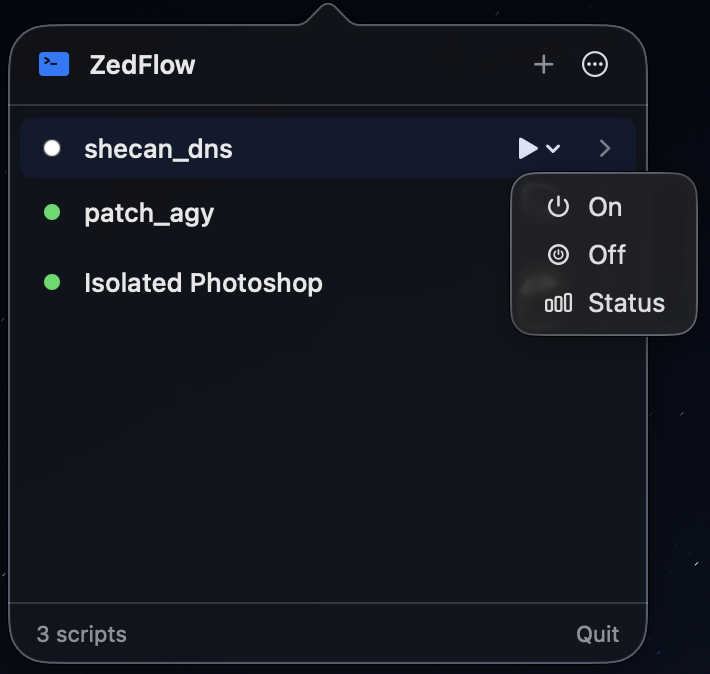
ZedFlow Menu Bar Popover Screenshot

Everything you need for effortless macOS automation

Designed as a true native citizen of macOS Sonoma and Sequoia — ultra-fast, zero electron bloat, and rock solid.

Menu Bar First

Lives discreetly in your menu bar. No dock clutter, no heavy windows. Instant access to your proxy toggles, docker cleaners, and scrapers.

Actions & Presets

Attach multiple action verbs to any script (e.g. start, stop, status, prod) each with custom flags and SF Symbol icons.

Reliable Force Stop

Recursively walks the process tree via proc_listchildpids to terminate runaway processes and all descendant child workers without dangling leaks.

Native Job Scheduler

Automate recurring tasks on flexible intervals (1m to 24h) or exact daily times (e.g., 09:30). Built-in sleep/wake drift compensation prevents backlog stampedes.

Headless IPC CLI (zedflow)

Full Unix Domain Socket control. Seamlessly integrates with Claude Code, Cursor, Raycast, Alfred, and shell scripts with structured --json output.

Zero-Config Shell

Resolves your actual interactive login shell environment: automatically loads Homebrew, nvm, pyenv, asdf, cargo, and custom PATH variables.

Universal Status Protocol

Scripts signal real-time status dynamically using stdout directives ([zedflow:status=active]) or standard LSB exit codes (0/2/3).

Streaming ANSI Console

Full ANSI color decoding with a 60fps throttled UI buffer. Keeps persistent execution logs of up to 50 past executions per script.

Clean, intuitive, and distraction-free

Explore the interfaces designed to make script management feel like second nature.

Menu Bar Quick Actions

Single-line compact script cards with dynamic status dots. When a script defines multiple action presets, an elegant minimal capsule dropdown lets you trigger specific subcommands with one click.

  • Dynamic indicators: Active (Green), Clear (Gray), Failed (Red), Running (Blue)
  • SF Symbol icons attached directly to individual action buttons
  • Interactive heartbeat probe support for continuous background health monitoring
Showcase Preview

Headless IPC Control for AI Agents & CLI

Everything configurable in the UI is 100% controllable via the zedflow CLI over Unix Domain Socket with structured --json output.

zsh
$ zedflow list
NAME STATUS SCHEDULE PATH
------------------ ------- -------- -------------------------------------------------------------------
shecan_dns active Manual /Users/developer/scripts/shecan_dns.sh
  ↳ Actions: On [on], Off [off], Status [status]
docker_prune success Daily /Users/developer/scripts/docker_clean.sh
  ↳ Actions: Dry-Run, Full-Prune
db_backup clear Interval /Users/developer/scripts/backup_pg.sh
# Discover all registered scripts, actions, schedules, and active statuses

Teach your scripts to communicate state

ZedFlow introduces a dead-simple status protocol. Any script can report its ongoing state using stdout directives or standard LSB exit codes without any SDK dependencies.

Active / Success

Exit code 0, or print anywhere in stdout:

echo "[zedflow:status=active]"
Clear / Inactive

Exit code 2 or 3 (LSB off), or directive:

echo "[zedflow:status=clear]"
Failed / Error

Any non-zero exit code (except 2/3), or directive:

echo "[zedflow:status=failed]"
Swift 6
Strict Concurrency Native
< 25 MB
Lightweight Memory Footprint
Universal
Apple Silicon + Intel (x86_64)
100% Native
Zero Electron / Web Bloat

Install ZedFlow on your Mac

Choose between pre-built universal binaries or building from source.

Recommended

Pre-built Universal Binary

Download the signed application bundle and standalone CLI archive from GitHub Releases.

  1. Download ZedFlow-v1.1.0-macOS-universal.zip
  2. Extract and move ZedFlow.app to /Applications
  3. (Optional) Copy zedflow to ~/.local/bin/zedflow
Download Latest Release
From Source

Build & Install with Script

Clone the repository and run the build script to compile with Swift 6 and install the app + CLI automatically:

git clone https://github.com/zephinax/zed-flow.git
cd zed-flow
./scripts/build.sh --install
View Repository

Got questions? We've got answers.

Where does ZedFlow appear after launching?
ZedFlow runs as a native macOS accessory menu bar item (with a terminal >_ icon) in the top-right menu bar. It does not occupy a slot in the macOS Dock or App Switcher, keeping your workspace distraction-free.
How does ZedFlow load environment variables and paths like Homebrew or nvm?
ZedFlow executes an interactive login shell probe in the background upon launch to extract your exact user environment ($PATH, pyenv, nvm, cargo, rbenv, Homebrew). Your scripts execute with the exact same binary paths and environment variables as your terminal.
Can AI coding agents (Claude Code, Cursor, Codex) configure scripts in ZedFlow?
Yes! The zedflow CLI provides full discovery and manipulation with a dedicated --json flag across all commands (e.g. zedflow list --json, zedflow add ..., zedflow run ...). AI agents can programmatically register, inspect, trigger, and verify automation without touching the UI.
What happens if a script spawns child background processes and I click Stop?
ZedFlow implements a robust process-tree termination engine using macOS proc_listchildpids. It recursively discovers all descendant child PIDs, issues SIGKILL to the process group and all sub-processes, and frees all file descriptor handles to ensure zero runaway background processes.

Automate without friction.

Take control of your recurring workflows, scripts, and dev tools directly from your Mac menu bar.

Download ZedFlow v1.1.0 Star on GitHub ⭐